Spreadsheets are where business decisions happen. Most of those decisions involve time.
Teams track weekly orders, plan inventory replenishment, schedule clinical shifts, and balance electrical load. Until now, Carla focused on tabular classification and regression using TabICLv2 running locally on WebGPU (1,2). Users can score leads, estimate property values, and evaluate customer churn directly inside Google Sheets without sending raw numbers to an external server.
Today, Carla adds native time series forecasting.
We unlocked this capability by porting Mistral AI’s newest Timestral-123M foundation model to FP16 ONNX, executing locally in your browser through WebGPU (3). Mistral detailed the model family’s architecture, training recipe, and benchmark results in their technical report, Timestral (arXiv:2610.37585) (HTML version).
Interactive Demo
The interactive example below showcases Timestral-5M for demonstration purposes only. It runs locally on three sample datasets; the Carla Google Sheets forecasting feature discussed here uses Timestral-123M.
For more detail on how time series forecasting creates value in practice, explore these dataset profiles:
- Nord Pool electricity prices — plan around day-ahead price swings using load and wind forecasts.
- Rohlik grocery orders — align fulfillment staffing, delivery capacity, and perishable stock with demand.
- Rossmann store sales — anticipate promotions and holidays when planning replenishment.
- Solar power with weather — improve generation schedules and reduce imbalance costs.
- Hospital emergency admissions — plan beds and clinical staffing for changing intake volumes.
How does forecasting work in Google Sheets?
Before diving into the underlying mechanics, here is how the interaction works inside your spreadsheet:
- Highlight your series: Select a chronological date column and a numerical target column (such as historical store orders or hourly electricity spot prices).
- Assign optional covariates: Map past-only covariates (such as sensor telemetry) or known future covariates (such as promotional flags or public holidays).
- Choose your forecast horizon: Specify how many future steps to predict (for example, the next 14 days or 24 hours).
- Execute on-device via WebGPU: The Carla Chrome extension tokenizes the series and evaluates
Timestral-123Mlocally on your device’s GPU, with inference latency depending on the number of series, context length, and forecast horizon. - Populate prediction intervals: The extension writes the median prediction along with probabilistic prediction intervals (such as the 10th and 90th percentiles) directly into adjacent spreadsheet cells.
+------------+-------------+-------------+-------------+-------------+
| Date       | Historical  | Forecast 10%| Forecast 50%| Forecast 90%|
+------------+-------------+-------------+-------------+-------------+
| 2026-10-24 | 1,420       |             |             |             |
| 2026-10-25 | 1,390       |             |             |             |
| 2026-10-26 | 1,450       |             |             |             |
| 2026-10-27 |             | 1,380       | 1,465       | 1,560       |
| 2026-10-28 |             | 1,395       | 1,480       | 1,595       |
| 2026-10-29 |             | 1,360       | 1,455       | 1,580       |
+------------+-------------+-------------+-------------+-------------+
You can test this workflow on real data using our Nord Pool Electricity interactive demo or review our Rohlik grocery orders dataset.
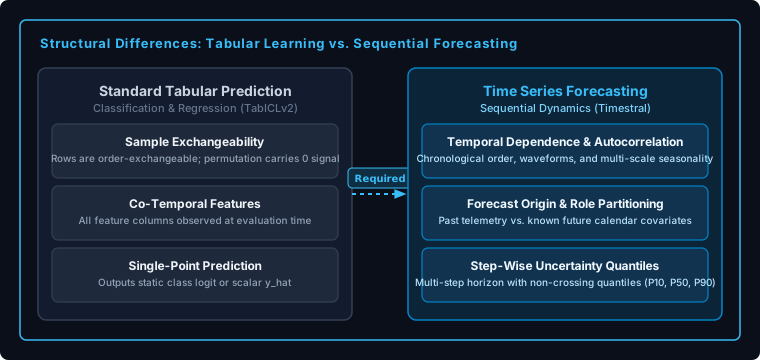
How does time series forecasting differ from classification and regression?
When developers approach time series for the first time, a common instinct is to treat it as ordinary tabular regression: sort by timestamp, construct a few lag columns, and fit a regressor.
While that pipeline can work under specific conditions, sequential forecasting differs from standard tabular tasks in three foundational ways:
1. Sample exchangeability vs. temporal dependence
Most conventional supervised tabular learning assumes samples are independent or exchangeable. In standard classification or regression, reordering row 10 and row 400 changes nothing. The joint feature-target distribution remains identical. Row order conveys zero information.
Time series observations exhibit strong autocorrelation and temporal dependence. Observations carry sequential continuity; a sales spike on Friday afternoon connects directly to previous seasonal cycles, trends, and recent demand shifts.
2. Forecast origin and information availability
In standard tabular prediction, features and targets are recorded co-temporally for each historical instance.
In forecasting, feature availability must be defined strictly relative to a forecast origin . Conditioning a prediction on future values that could not have been observed at time introduces temporal information leakage.
Forecasting architectures must partition inputs into three explicit roles:
- Target series (): Observed up to the forecast origin ; unknown and predicted across the horizon .
- Past covariates (): Historical indicators observed only up to time (such as recorded warehouse temperatures or foot traffic counters).
- Known future covariates (): Metadata known in advance across both past context and future horizon (such as calendar day of week, scheduled promotional campaigns, or holiday calendars).
3. Point predictions vs. probabilistic multi-horizon forecasting
Standard tabular regression produces a single scalar point prediction .
Forecasting produces a sequence of step-wise probabilistic predictions across an -step horizon (). Uncertainty often increases as the horizon lengthens, though it can fluctuate non-monotonically due to periodic seasonality and calendar cycles.
For supply chain and operational planning, a single point estimate (such as the conditional mean) is insufficient. An operations manager needs probabilistic prediction intervals (such as the 10th and 90th percentiles) to balance the cost of stockouts against the cost of excess perishable inventory.
Why not use lag features with tabular models?
Lag-based forecasting with gradient-boosted decision trees (such as LightGBM or CatBoost) remains a proven approach when extensive training data and domain-specific feature engineering are available (4). The winning solution to the M5 Accuracy competition combined recursive and direct tree ensembles with carefully crafted lag, rolling, and calendar features.
However, deploying custom lag pipelines inside a client-side spreadsheet extension creates distinct operational constraints:
1. Feature dimensionality and browser memory
Capturing weekly and diurnal seasonality in hourly data requires combining lag terms, Fourier components, rolling statistics, and calendar metadata. When multiple continuous covariates are added, the materialized feature matrix widens significantly.
In tabular foundation models like TabICLv2 or TabPFN, wide matrices of engineered lag and rolling columns inflate input feature dimensionality and memory consumption. Materializing hundreds of engineered columns creates substantial tensor allocation overhead that pushes against browser WebGPU buffer limits.
2. The overhead of per-dataset training pipelines
Traditional tree-based forecasting requires a full training pipeline: defining lag structures, validating hyperparameter choices, fitting tree ensembles, and updating models as new rows arrive.
Inside a browser extension where an analyst highlights an arbitrary column range in Google Sheets, users expect immediate results. Running a multi-step feature engineering and model training pipeline inside a browser tab introduces latency and setup friction.
A pretrained sequential foundation model provides a zero-shot path: it evaluates temporal patterns directly from historical context without per-dataset training loops.
How does Timestral solve sequential forecasting?
Mistral AI designed Timestral specifically for zero-shot in-context time series forecasting, detailing the architectural mechanics in their technical report (3).
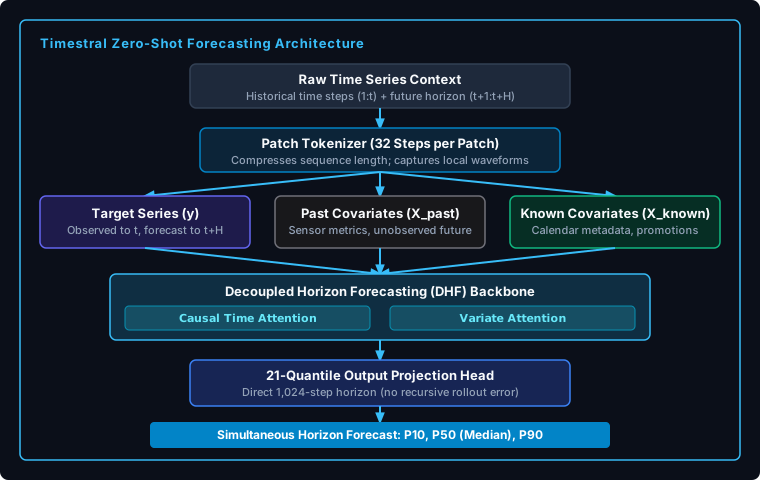
Timestral-123M incorporates several architectural innovations:
1. Patch tokenization with 32-step windows
Similar to tokenization in vision transformers, Timestral-123M groups consecutive numerical observations into non-overlapping patches of 32 steps.
This design shortens sequence length by a factor of 32, allowing the transformer to process long histories within WebGPU memory budgets while capturing local derivative shapes and high-frequency waveforms.
2. Decoupled Horizon Forecasting (DHF)
Some patch-based forecasting architectures represent future observations as masked positions. Timestral instead separates forecast tokens from observed context through Decoupled Horizon Forecasting (DHF).
DHF uses specialized forecast tokens that attend to the observed history and known future covariates without requiring recursive single-step autoregression. For horizons within its single-pass window (up to 1,024 steps, or 32 patches), the model projects the full multi-quantile horizon in a single forward pass, preventing recursive error feedback loops.
For horizons extending past 1,024 steps, Timestral switches to block-autoregressive decoding, feeding predicted block medians into subsequent blocks.
3. Factorized time and variate attention
Multivariate forecasting involves two dimensions: temporal dynamics across time steps, and cross-series correlations across variates.
Timestral factorizes these operations into two alternating stages:
- Causal time attention: Models temporal trends and seasonal patterns across patches within each series.
- Variate attention: Models cross-correlations between the target series and accompanying covariates at aligned time steps.
4. 21 predictive quantiles with non-crossing guarantees
Timestral-123M emits 21 predictive quantiles simultaneously across the prediction horizon: P01, P05, P10, P15, P20, P25, P30, P35, P40, P45, P50 (median), P55, P60, P65, P70, P75, P80, P85, P90, P95, and P99. The projection head predicts the median directly and computes remaining quantiles via cumulative softplus positive increments, preventing quantile crossing by construction. These 21 quantiles provide fine-grained estimates of forecast uncertainty at every future time step, helping teams evaluate operational risk.
Published Timestral-123M model specifications
As documented in the Timestral technical report:
- Model parameters: 122.6M parameters (20 Transformer blocks, 10 heads, , SwiGLU width 1,712)
- Attention mechanisms: Sigmoid-gated causal time attention with RoPE (on half-head dimensions) and variate cross-attention in every 4th block
- Patch length: 32 time steps embedded via a 2-layer residual MLP with missing-value indicators and causal standardization ()
- Context length: 8,192 steps (pretraining on synthetic prior); extended to 32,768 steps in post-training
- Direct single-pass horizon: 1,024 steps (32 patches)
- Output quantiles: 21 non-crossing quantiles (
P01throughP99) - Model weight size: 490 MB in float32; ~246 MB in Carla’s FP16 ONNX format
What do published benchmarks show?
AutoGluon’s fev-bench is an open benchmark suite evaluating foundation models across 100 diverse forecasting tasks (5). Tasks span energy grids, retail sales, hospital admissions, traffic counts, and financial indicators across hourly, daily, and weekly frequencies.
Models are evaluated on Scaled Quantile Loss (SQL) and Mean Absolute Scaled Error (MASE). SQL measures probabilistic forecast quality using scaled pinball loss across prediction quantiles.
Here is how foundation models and baselines compare in our October 2026 snapshot of 41 evaluated methods on the fev-bench leaderboard:
| Rank (by SQL Win Rate) | Model | Organization | Model Family | Published Runtime | Win Rate (SQL) | Skill Score (SQL) | Reference Median Latency |
|---|---|---|---|---|---|---|---|
| 1 | Timestral-209M | Mistral AI | Foundation Model | Reference Benchmark | 87.72% | 50.39 | 0.51 s |
| 2 | Timestral-123M | Mistral AI | Foundation Model | Reference Benchmark | 86.85% | 50.18 | 0.32 s |
| 3 | TimeRSI | GaTech / SamayLabs | Closed-Source API | Server API | 84.80% | 51.24 | 2,511.71 s |
| 4 | t0-gamma | The Forecasting Co. | Foundation Model | PyTorch GPU | 84.40% | 49.42 | 4.38 s |
| 5 | Timestral-28M | Mistral AI | Foundation Model | Reference Benchmark | 79.18% | 48.42 | 0.11 s |
| 6 | TimesFM-3 | Foundation Model | PyTorch GPU | 78.55% | 48.99 | 3.41 s | |
| 9 | Chronos-2 | AWS | Foundation Model | PyTorch GPU | 70.43% | N/A | 0.84 s |
| 20 | TabPFN-TS-3 | Prior Labs | Foundation Model | PyTorch GPU | 52.42% | 43.15 | 234.62 s |
| 37 | LightGBM (MLForecast) | AutoGluon Baseline | Tree Ensemble | CPU / GPU | 17.75% | 20.98 | 3.03 s |
| 39 | Seasonal Naive | Reference Baseline | Statistical | CPU | 12.80% | 3.12 | 0.02 s |
Methodology note: The figures above reflect published results from the official fev-bench evaluation suite across 100 tasks (October 2026 snapshot) [@fevbench2026]. Ranking corresponds to pairwise SQL win rate among the 41 evaluated methods in this snapshot. Latency figures represent reference server-side evaluation environments and should not be confused with on-device WebGPU browser execution.
In this published benchmark, Timestral-123M achieved an 86.85% SQL win rate and a 50.18 SQL skill score, closely matching its larger 209M sibling (50.39) while operating with substantially lower compute overhead. Across the broader evaluation battery reported in the Timestral technical report (including GIFT-Eval, TIME, fev-bench, and the industrial IND-Eval benchmark), Timestral-209M and Timestral-123M secure the top two ranks across every evaluated metric, with all four Timestral sizes establishing the empirical Pareto frontier of forecast accuracy versus model size.
Bringing Timestral into the browser: Carla’s WebGPU port
Mistral demonstrated what pretrained foundation models can achieve for time series forecasting. Carla makes that capability accessible where business decisions actually happen: directly inside spreadsheets, without requiring a Python environment, a dedicated GPU cluster, or a paid model-inference API.
Bringing this architecture directly into the browser required three engineering steps:
- FP16 ONNX conversion: We exported the model weights to FP16 ONNX, producing an artifact weighing approximately 246 MB.
- WebGPU operator optimization: We adapted the computation graph for
onnxruntime-web’s WebGPU execution provider, optimizing buffer bindings and attention kernels to fit within browser storage buffers. - Numerical parity validation: Numerical parity was validated against the original PyTorch FP16 implementation across evaluated holdout test cases, with a maximum absolute difference of between normalized quantile predictions.
Cold load vs. warm inference in the browser
When running in-browser machine learning, user experience depends on two distinct phases:
- Cold initialization: On first use, the browser downloads the ~246 MB weight artifact, caches it locally in
IndexedDBandCacheStorage, compiles WebGPU shaders, and initializes the ONNX session. - Warm inference: On subsequent runs, model weights load directly from local browser cache. Latency scales transparently with the number of series, context length, and horizon: single-series forecasting executes in approximately 140 ms, while multi-series panel datasets with longer horizons scale from 1 to 6 seconds.
Validating on representative tasks
To verify on-device browser execution, we evaluate Timestral-123M in Carla across three representative forecasting tasks from our benchmark catalog:
| Dataset | Domain | Cadence | Series Count | Horizon () | Metric (SQL) | WebGPU Warm Latency | Live Demo |
|---|---|---|---|---|---|---|---|
| Nord Pool (epf-np) | Energy Markets | Hourly | 1 series | 24 steps | 0.5136 | 139 ms | Open Sheet |
| Rohlik Orders (rohlik-orders-1d) | E-Commerce Grocery | Daily | 7 series | 61 steps | 0.9335 | 2.0 s | Open Sheet |
| Rossmann Sales (rossmann-1d) | Retail Chain Sales | Daily | 1,115 series | 48 steps | 0.2690 | 5.9 s | Open Sheet |
Test environment: Chrome 156 on Apple M2 Max (32 GB unified memory). Latencies reflect mean fold execution time of warm WebGPU runs following initial shader compilation and IndexedDB cache load. For Rossmann, the 5.9-second latency measures end-to-end model inference across all 1,115 store series in a 48-day evaluation window, executed in streaming series batches on WebGPU. Measurements isolate model inference and tensor operations from Google Sheets cell rendering and DOM updates.
Privacy, governance, and on-device execution
Understanding the boundary of browser-local execution is essential for technical teams:
- Data stays within your existing boundary: Google Sheets synchronizes spreadsheet content through Google’s cloud infrastructure. Carla does not send your data to an external machine learning or model-inference API. All tensor preprocessing and model forward passes execute on your local device via WebGPU.
- Zero per-token billing: Because inference runs on client hardware, forecasts incur no API token fees or cloud compute markups.
- Governance considerations: Local inference eliminates data egress to third-party AI endpoints. Enterprise extension deployment policies, Google Workspace admin permissions, and organizational data handling guidelines still apply.
Expanding Carla’s predictive capabilities
Carla’s design objective is to provide fast, private machine learning directly inside spreadsheet workflows.
With Timestral-123M integrated alongside TabICLv2, Carla now supports three core predictive modeling tasks directly in spreadsheets: classification, regression, and time series forecasting:
- Classification: Lead qualification, fraud identification, customer churn scoring, and risk categorization via
TabICLv2. - Regression: Property valuation, price estimation, and salary modeling via
TabICLv2. - Time series forecasting: Order projections, energy consumption planning, inventory reordering, and budget forecasting via
Timestral-123M.
All three capabilities execute on-device inside your browser.
Try time series forecasting in Google Sheets
If your team tracks operational metrics, demand schedules, or financial projections in Google Sheets, you can test Timestral-123M today:
- Install the Carla Chrome Extension to run local, privacy-preserving forecasts directly inside Google Sheets.
- Review our head-to-head model comparisons and demo datasets across our time series benchmark suite.
- Read the official technical report: Timestral on arXiv or explore the arXiv HTML reader.
